
Order Management
Feature Release
Roaster's Choice


Flexnet AI Help turns rough typed or voice-to-text customer notes into clear, structured activity updates, complete with suggested follow-up tasks and satisfaction scores.
That's right! We’ve introduced a new AI-powered way to create company activities in Flexnet, designed to make logging updates quicker, clearer, and more consistent.
The idea started with a simple feature request: to log notes using voice-to-text between appointments. If you can speak your thoughts into your phone while you’re on the move, AI should be able to turn that rough voice note into useful, well-structured notes. Ideally, you'd never have to copy and paste the information between platforms again.
When you create a new activity for a company, you’ll first see a template type. You can use it as a guide, edit it to suit your update, or clear it completely using the button in the top-right corner and start with a blank page.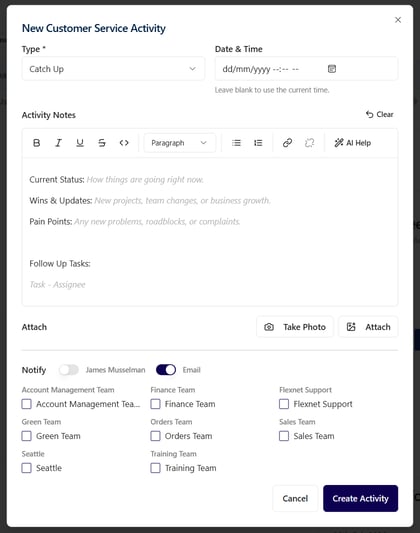 From there, simply add your notes in whatever form is easiest. You do not need to complete the task fields beforehand. AI can help identify and structure those for you.
When you’re ready, select AI Help in the top-right corner of the text field. You’ll be able to choose the format you want, such as dot points or conversational for a short paragraph. Flexnet then uses OpenAI’s models to transform your input into polished activity notes.
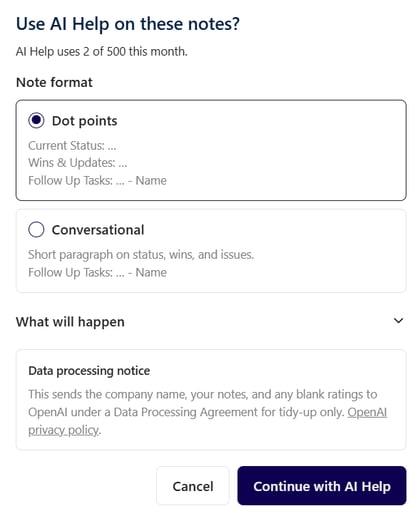
After reviewing the result, you can choose Accept to replace your original text with the AI-generated version. If your workflow uses scores, Flexnet can also suggest relevant product, company, or personal satisfaction scores based on the context of your notes.
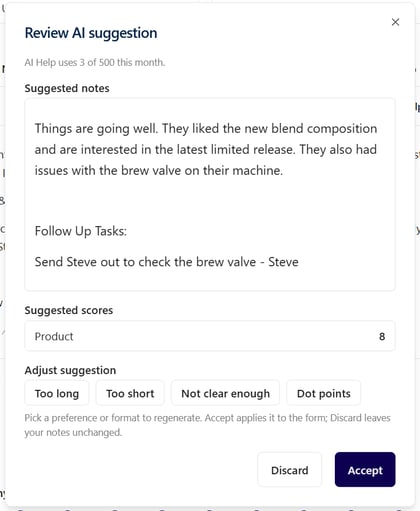
For example, a note such as “they liked the blend composition” may result in a high product score suggestion. Positive statements like “they love us” can similarly inform satisfaction-score recommendations.
Your own satisfaction scores are protected: if you set them before using AI Help, they will not be overwritten.
You remain in control of the final output. You can ask AI to make the response shorter, longer, or clearer, or switch to the alternate layout before accepting the update.
The benefits are clear: capture your thoughts quickly, whether typed or dictated, and let AI handle the formatting. That means less time writing activity notes and more consistent, useful information for everyone.
We’d love your feedback as you try it. If this approach proves valuable, the next step is to turn AI-identified tasks into real Flexnet tasks, complete with reminders and follow-up support.
Can I use voice-to-text with Flexnet AI Help? Yes. Dictate notes into the activity field, then use AI Help to organise and format them.
Will AI overwrite my satisfaction scores? No. Scores you have already entered are preserved.
Can I choose the format of my notes? Yes. Choose a conversational summary or dot points, then refine the suggestion before accepting it.